
Find your way around the app
The Groundsman app has five tabs, an Undo button, and a footer that shows how it’s connected. Everything you can change is on one of the tabs.
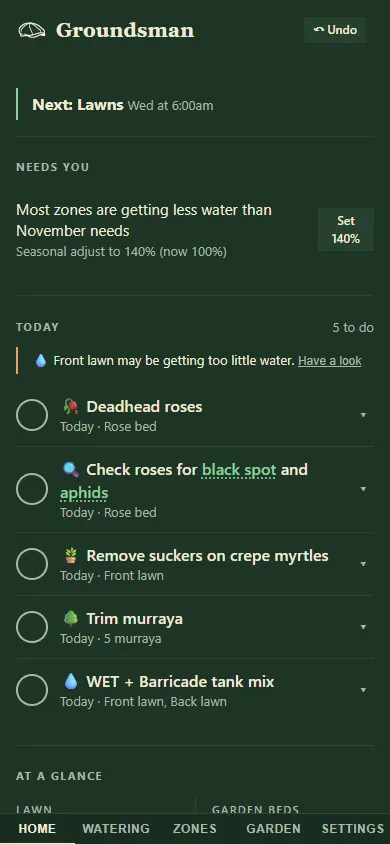
Home on a phone, with the tabs along the bottom.
The tabs and Undo
Section titled “The tabs and Undo”- The tabs: Home, Watering, Zones, Garden and Settings. On a wider screen they sit in the header. On a phone they sit along the bottom of the screen, in reach of your thumb. A number on the Home tab means there are alerts to look at.
- ↶ Undo appears in the header after you change something. It takes back your last change. See Undo.
What’s happening now and what needs doing:
- alerts at the top, then what’s watering or what’s next;
- Needs you: things to check, such as a zone getting too much water or setup questions to answer, each with a button that fixes it;
- Today, the checklist of jobs;
- At a glance: lawn and bed areas, next watering, next lawn date and the next few jobs;
- the map with running zones lit up;
- Watering controls (rain delay, seasonal adjust, rain figures);
- Zones, with quick runs and Test 1 min;
- Recent runs, Water used and Activity.
More: Home tab.
Watering
Section titled “Watering”How and when the garden is watered:
- the This week chart of every run, which you can drag to change;
- Health check: one line that says whether every zone is getting about what it needs, or how many things to look at. Open shows the details: Right amount?, Watering rules and Running together;
- Programs, with + New program.
More: Watering tab.
The irrigation setup: your Property map, drawing zones, Block size, Map image, Timers (each zone’s settings and setup questions), Soil sensors and sprinkler heads. See Zones tab.
Garden
Section titled “Garden”Plants and care: the map with your plants and the Plants card, the job list, lawn dates, weeds, the mowing plan, products, plan cost and the season calendar. See Garden tab.
Settings
Section titled “Settings”Every preference in one place, starting with “I’m your groundsman, after all. You tell me how you want it done.” Changes save as you make them.
- The app: Show Everything or Simple.
- Watering: running together, seasonal adjust, rain delay, rain, flow alerts, soil, weather and watering rules.
- Lawn and mowing, and Products and plan.
- This controller: the version, updates and restarts.
See Settings tab.
The details panel
Section titled “The details panel”Some things open in a panel instead of on the page: the watering health check, and a zone’s setup questions. On a wide screen the panel opens beside the page. On a phone it slides up from the bottom as a sheet. Close it with ✕, by tapping outside it, or with Esc on a keyboard.
The footer
Section titled “The footer”The line at the bottom shows the version and how Groundsman is connected:
- Running locally: it works at home only.
- Synced to Groundsman cloud, with the time of the last sync, plus “remote control on” when remote control is live.
- Scroll down each tab for the cards below. On a phone they stack in one column.
- Most cards have a short line of help underneath. Tap an (i) for more.
Related
Section titled “Related”Groundsman · smart watering and lawn care for Adelaide homes ·hello@groundsman.au