
Set up a watering schedule
A watering schedule in Groundsman is a program: a set of zones that water in order, on certain days, at certain times. You can have as many programs as you like, for example one for the lawns and one for the garden beds.
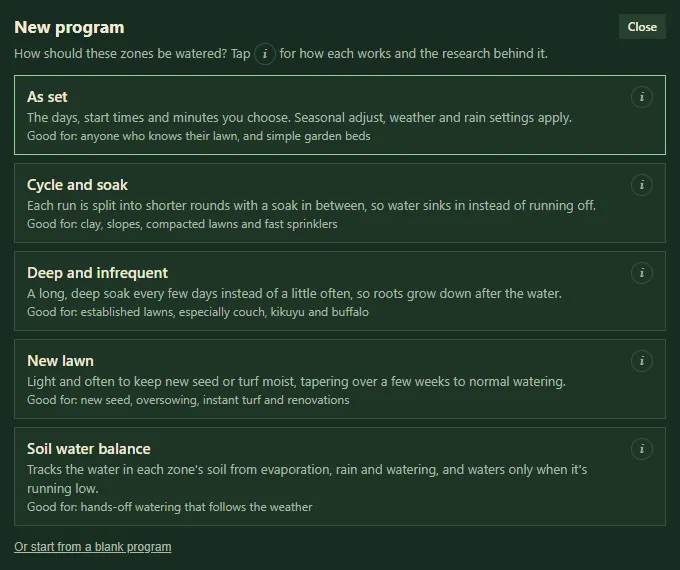
Choosing how to water when you add a program.
Create a program with the wizard
Section titled “Create a program with the wizard”- Open the Watering tab and tap + New program.
- Pick a watering method, such as As set, Cycle and soak or Deep and infrequent. Tap (i) on any of them to read how it works. See Watering methods.
- Under Which zones?, tick the zones this program waters.
- Tap Suggest settings. Groundsman works out the settings from each zone’s grass or plants, its watering rate and your soil.
- The program editor opens with the suggestion filled in. Check it, change anything you like, and tap Save.
To start from nothing, tap Or start from a blank program in step 2.
The program editor
Section titled “The program editor”To change a program later, tap Edit next to it.
- Name: for example “Lawns, mornings”.
- Method: change the watering method.
- Days: tap the days (or use Every day, Mon/Wed/Fri or Tue/Sat), or choose Every 2 days, Every 3 days, Every 4 days, Every 5 days or Once a week from a start date.
- Start times: one or more. Tap + Add for another. Early morning is best for lawns.
- Zones, in order: the minutes for each zone. Use ↑ to move a zone up, ✕ to remove it, or + Add zone…. You can also tap zones on the map.
- Cycles: how many rounds (1 to 6). With more than one, each zone waters several times, taking turns, so water soaks in between.
- Soak between rounds: the least time before a zone’s next round. Other zones’ turns count towards it.
- Let zones run side by side when the rule allows: follows your Running together rule. Off means one zone after another.
Tap Save, or Cancel to leave it as it was. Delete removes the program (and can be undone).
Switch a program off
Section titled “Switch a program off”Use the switch next to a program in the list. It stays saved but doesn’t run until you switch it back on.
- After saving, look at the This week chart to see how your programs fit together.
- Check Needs you on Home, or Health check > Open on the Watering tab, for the Right amount? and Watering rules checks. They flag zones getting too much or too little, and start times in restricted hours.
- On heavy clay, use two or three rounds instead of one long run, so water doesn’t run off. See How to water clay soil without runoff.
Related
Section titled “Related”Groundsman · smart watering and lawn care for Adelaide homes ·hello@groundsman.au