
Home tab
Home is the first tab in Groundsman and the one you’ll open most. It shows what needs your attention, what’s watering and what’s coming up.
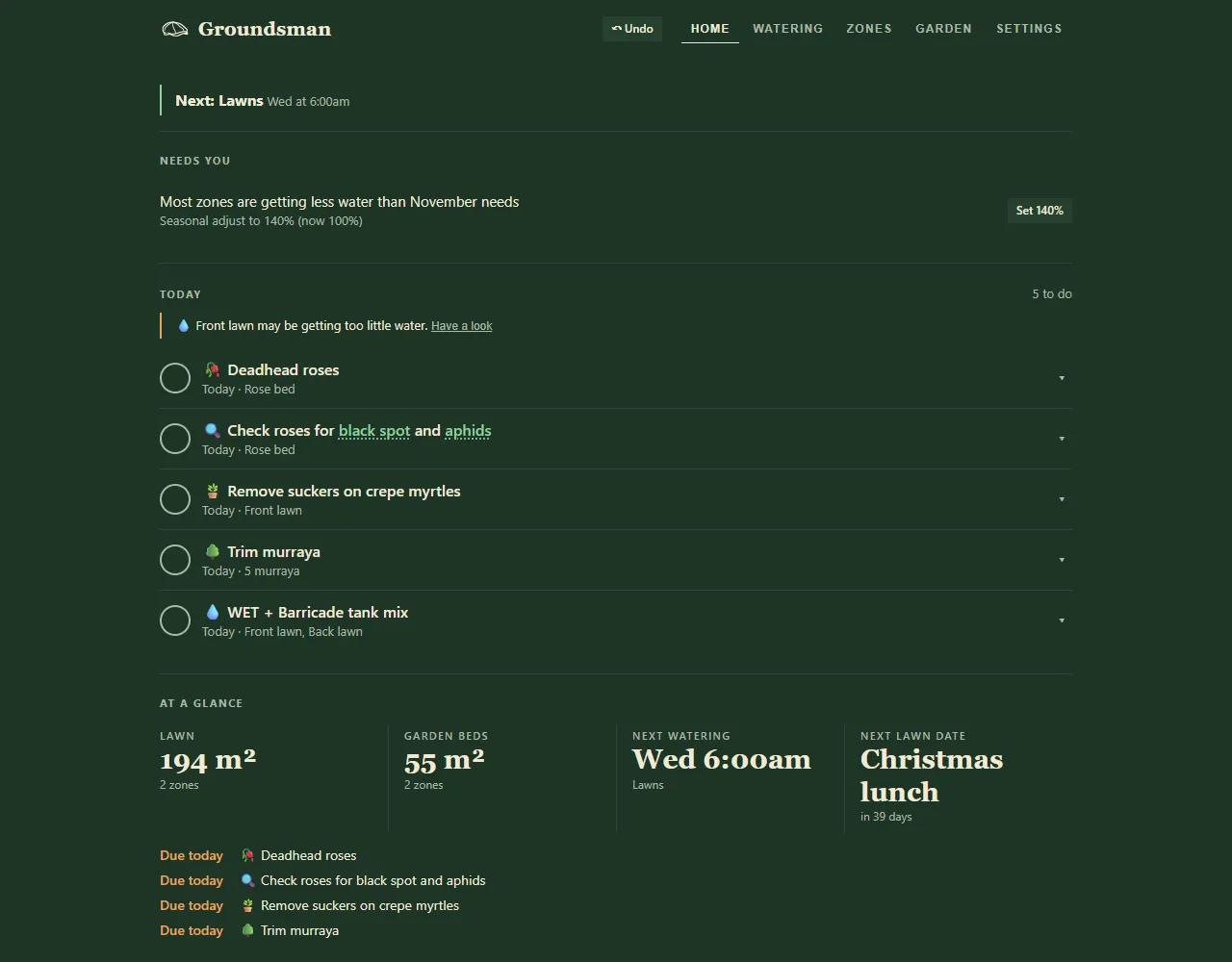
The Home tab, with Needs you and today's jobs, for an example garden.
From top to bottom
Section titled “From top to bottom”Alerts
Section titled “Alerts”Anything that went wrong with watering shows first, such as a zone that didn’t water or more water than usual. The Home tab shows a count of alerts, so you see them from any tab. Each alert has advice, I’ve checked it: clear and History. See Watering alerts.
What’s watering, or what’s next
Section titled “What’s watering, or what’s next”While a zone is running you see its name and the minutes left, with Stop all. Otherwise it shows the next program and when it starts, and says if a rain delay will skip it.
Needs you
Section titled “Needs you”Things to check, each with a button that fixes it. The card only shows when there’s something on it:
- a zone with setup questions still to answer: Answer (or Start, when several zones need finishing);
- most zones getting more or less water than this month needs: Set the seasonal adjust to the suggested %;
- one zone getting too much water, not enough, or none from any program: Cut to or Raise to the mm it needs, or Add a program;
- a program putting down more at once than the soil takes in: Split into shorter rounds;
- a program that starts in restricted hours: Move to an allowed time.
The same checks sit under Health check on the Watering tab. See Right amount? and Watering rules.
The checklist of jobs due today and overdue, from mowing to fertilising, with how many are left to do. Tick a job when it’s done, or use Later to move it to Tomorrow, +2 days or Next week. See Today checklist.
At a glance
Section titled “At a glance”Your lawn and garden bed areas, the next watering, the next lawn date and the next four jobs.
The map
Section titled “The map”Your property map, with any running zone lit up.
Watering controls
Section titled “Watering controls”- Rain delay: pause programs for 1d, 2d, 3d or 1 wk.
- Seasonal adjust: a slider from 10 to 200% that scales every scheduled run.
- Rain: the last 24 hours’ rain and the forecast, what Groundsman will do about it, and Refresh.
See Seasonal adjust and rain delay and Rain and weather.
Each zone with its next and last run, soil moisture if it has a sensor, and battery. Each zone has:
- Test 1 min to check the tap is working;
- 10m, 20m and 30m to water it now;
- History for its run history;
- Measure its watering rate, the catch-cup test (not on drip or weeper zones).
At the top of the card, Test timers opens a page listing every outlet. See Water a zone now.
Recent runs, Water used and Activity
Section titled “Recent runs, Water used and Activity”- Recent runs: the last few runs, including skipped ones and why. All runs opens the full history.
- Water used: litres this week and in the last 30 days, the next 7 and 30 days projected, and a table by zone. Chart and Monthly report open more.
- Activity: a log of recent actions, including remote ones from the cloud.
- In Simple view, Home is shorter, with one Actions button and the rest under Show more.
- Pin the app to your home screen and check Home each morning: alerts, fixes and jobs are all here.
Related
Section titled “Related”Groundsman · smart watering and lawn care for Adelaide homes ·hello@groundsman.au