
This week chart
The This week chart, at the top of the Watering tab, shows every run your programs will make over the next seven days. You can change your watering by dragging it.
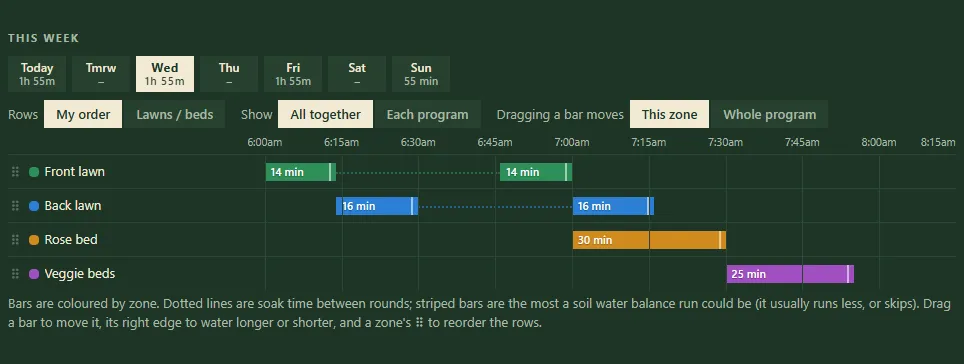
Two programs in the This week chart: lawns in two rounds with a soak between, then the beds.
Read the chart
Section titled “Read the chart”- Open the Watering tab.
- Tap a day in the row of days at the top. A day with a rain delay says its programs are skipped.
- Each bar is one zone watering, coloured by zone. Its position is the time; its length is the run time.
- Dotted lines are soak time between rounds (cycle and soak).
- Striped bars are the most a soil water balance run could be. It usually runs less, or skips.
- A note under the chart tells you how many zones don’t water that day.
Change the view
Section titled “Change the view”- Rows: My order (the order you’ve set) or Lawns / beds (grouped).
- Show: All together, or Each program on its own chart.
Change your watering by dragging
Section titled “Change your watering by dragging”- Set Dragging a bar moves to:
- This zone, to move one zone; or
- Whole program, to move the program’s start time.
- Drag a bar left or right to move it.
- Drag a bar’s right edge to make it water longer or shorter.
- Drag a zone’s ⠿ handle to reorder the rows.
Dropping a zone within its program’s run changes its place in the order. Dropping it well away from the rest makes it water on its own at that time, as a separate program.
Moves and resizes save straight away and show a message with Undo. The row order is a viewing choice, kept on the device you set it on.
- Use the chart after adding a program, to check zones don’t pile up on one tap. The Running together rule decides what can overlap.
- Seasonal adjust and the weather change run lengths, so bars grow and shrink with the season.
- A projected day on the Water used card opens that day here.
Related
Section titled “Related”Groundsman · smart watering and lawn care for Adelaide homes ·hello@groundsman.au